
Download BP Pulse Protector – blood pressure monitor, BP tracker, health app, free health tool, Android health app, blood pressure log, heart health tracker, wellness app
Overview
BP Pulse Protector is a free Android application developed by PulseGuard, designed to support individuals in monitoring their blood pressure with minimal effort. The app falls within the health and fitness category, offering a dedicated platform for recording and tracking blood pressure readings over time. Its primary purpose is to simplify the process of managing cardiovascular health by replacing manual tracking methods with a digital, streamlined solution. Target users include health-conscious individuals, those managing hypertension or other heart-related conditions, and anyone seeking to maintain long-term wellness through consistent monitoring.
The app emphasizes user privacy by storing all health data locally on the device, ensuring that sensitive information remains under the user’s control. This design choice enhances trust, particularly for users concerned about data security in digital health tools. Real-world usage scenarios include daily tracking for chronic condition management, periodic check-ins for preventive care, and long-term trend analysis to support informed discussions with healthcare providers. While the developer did not provide additional details about the app’s background or broader ecosystem, its focus on simplicity, privacy, and ease of use positions it as a practical tool for personal health monitoring.
Key Features & Capabilities
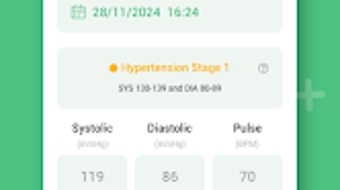
- Simple Blood Pressure Logging – Users can quickly input systolic and diastolic readings, along with pulse rate, directly into the app. This streamlined process eliminates the need for spreadsheets or notebooks, reducing the chance of missed or inaccurate entries.
- Secure Local Data Storage – All health information is stored exclusively on the user’s Android device. No data is transmitted to external servers, which supports privacy-focused users who wish to maintain full control over their medical records.
- Reading History and Trends – The app maintains a chronological log of all entries, enabling users to review past readings and identify patterns over time. This feature supports proactive health management and can be valuable during medical consultations.
- Intuitive User Interface – Designed for accessibility, the interface allows users of varying technical skill levels to navigate and use the app with ease. Input fields are clearly labeled, and the layout prioritizes clarity and efficiency.
- Free Access with No In-App Purchases – The app is available at no cost, with no advertisements or premium upgrades mentioned. This makes it accessible to a wide audience seeking a no-frills health tracking solution.
These capabilities cater to users who want a lightweight, reliable tool for tracking vital health metrics without complexity. For example, a user managing hypertension might log readings twice daily, review weekly trends, and share the data with their physician. Similarly, someone monitoring general heart health can use the app for periodic check-ins, helping them stay informed and engaged in their wellness journey.
User Interface, Workflow & Performance
BP Pulse Protector features a clean, minimalist interface that prioritizes ease of use and quick access to core functions. Navigation is straightforward, with a primary screen dedicated to entering new readings. The layout is optimized for touch input, making it suitable for use on various Android devices. Users can input systolic pressure, diastolic pressure, and pulse rate with minimal taps, reducing friction during routine logging.
Workflow efficiency is enhanced by the app’s focus on essential functions—no unnecessary menus or complex settings. This design philosophy supports consistent use, especially for users who may not be tech-savvy or prefer low-effort health tools. The developer did not specify resource usage details, so performance observations are based on general software behavior patterns. However, the app’s compact size of 12.5 MB suggests it is lightweight and unlikely to strain device resources.
Stability is expected to be consistent given the app’s limited scope and focus on a single function. Without cloud synchronization or background services, the risk of crashes or memory leaks is reduced. The app’s performance is likely to remain smooth during regular use, though real-world testing would be required to confirm long-term reliability under varied conditions.
Compatibility & System Requirements
BP Pulse Protector is designed for Android devices and is compatible with the operating system as of its release on April 10, 2024. The app has a file size of 12.5 MB, indicating a lightweight footprint that should install and run efficiently on most modern Android smartphones and tablets. However, exact system requirements were not listed, including minimum Android version, CPU specifications, or RAM thresholds.
Compatibility information was partially provided, leaving some uncertainty about support for older or low-end devices. Users are advised to verify device compatibility through the official app store listing. The absence of detailed hardware or software prerequisites means that installation and operation may vary depending on individual device configurations. The developer did not provide additional system requirements, so users should proceed with caution if their device falls outside typical Android usage patterns.
Pros and Cons
Pros
- Free to download and use with no ads or in-app purchases
- Local data storage ensures strong privacy and security
- Simple, intuitive interface suitable for all user levels
- Lightweight design with a small file size of 12.5 MB
- Efficient workflow focused on core blood pressure tracking
Cons
- No cloud backup or synchronization across devices
- Exact system requirements not specified
- Limited to Android platform, no support for iOS or desktop
- No advanced analytics or trend visualization features
- Relies solely on user input without integration with external devices
FAQ Section
Is BP Pulse Protector safe to use?
The app is designed with user privacy in mind. All health data is stored locally on the device and is not shared with third parties or external servers. This local-only storage model enhances security and reduces the risk of data breaches.
Can I use BP Pulse Protector on iOS devices?
No. The app is currently available only for Android. There is no official version for iOS or other platforms.
Does the app require an internet connection?
While the app functions offline, an internet connection may be needed for future updates or if additional features are added. However, core functionality such as logging and viewing readings works without connectivity.
How often should I update the app?
Updates are recommended to ensure access to the latest features, security patches, and compatibility improvements. Users should check for updates through their device’s app store regularly.
Is my data backed up if I lose my device?
Since data is stored locally, there is no automatic backup. Users are responsible for manually transferring or backing up their health records if they switch devices.
Final Thoughts + CTA
BP Pulse Protector offers a focused, privacy-first solution for individuals seeking to monitor their blood pressure without complexity. Its clean interface, local data storage, and free access make it a compelling choice for users who value simplicity and security. While it lacks advanced features like cloud sync or device integration, its streamlined approach ensures consistent use and reliable tracking. The app is especially beneficial for those managing hypertension or simply staying proactive about heart health. For users who prioritize control over their health data and prefer a no-frills tool, BP Pulse Protector delivers on its core promise.
Download BP Pulse Protector now







